They send a photo. You make the sale.

HabariChat knows your product catalog. When a customer sends a picture or asks for something by name, your AI finds it, sends the product card, and takes the order, ready for you to approve.

Search by photo
Buy now on WhatsApp
Human approves every order
14-day free trial
MN
Mama Njeri Electronics
online
๐Ÿณ
Do you have this one?
๐Ÿณ
Ramtons 24cm Non-stick Frying Pan
Cookware ยท In stock
KES 2,450
๐Ÿ›’ Buy now
Yes please, I will take two.
Order draft #HC-1042
Frying pan ร— 2KES 4,900
Delivery ยท KasaraniKES 300
TotalKES 5,200
โœ“ Approve & send
10:16 AM โœ“โœ“

You are not losing sales because you lack a storefront.

You are losing them in the gap between a customer asking and somebody answering.

The 9pm question

"Do you have this in blue?" arrives after closing. By the time someone opens the phone on Tuesday, the customer has bought elsewhere.

The blurry photo

Customers send a picture of what they want, not a product code. Somebody has to scroll the shelves or the phone gallery to work out what it is.

The pasted price list

A wall of text with forty items and no pictures. The customer reads three lines, asks "how much for the second one," and the thread starts over.

The order that never landed

Agreed in a chat, written on a notebook, forgotten by the driver. Nobody can say what was ordered, at what price, or whether it went out.

See the catalog sell.

A photo comes in, product cards go out, and an order waits for your approval.

Visual search

A customer sends a photo. We find it.

Someone snaps the product they want, from a competitor's post, a friend's kitchen, or a magazine, and sends it to you. HabariChat matches that image against every photo in your catalog and replies with what you actually stock.

No SKU. No product name. No "please describe the item." Just the picture.

Works the other way too. Describe an item in words and we still match it against your product photos.

๐Ÿ“ท
Customer photo received
WhatsApp ยท 10:15 AM
๐Ÿณ
Ramtons 24cm Non-stick Pan
Closest match
KES 2,450
๐Ÿณ
Tefal 26cm Granite Pan
Also similar
KES 4,200
๐Ÿฅ˜
Ramtons 3-Piece Pan Set
Also similar
KES 6,900
WhatsApp product cards

Product cards, not paragraphs.

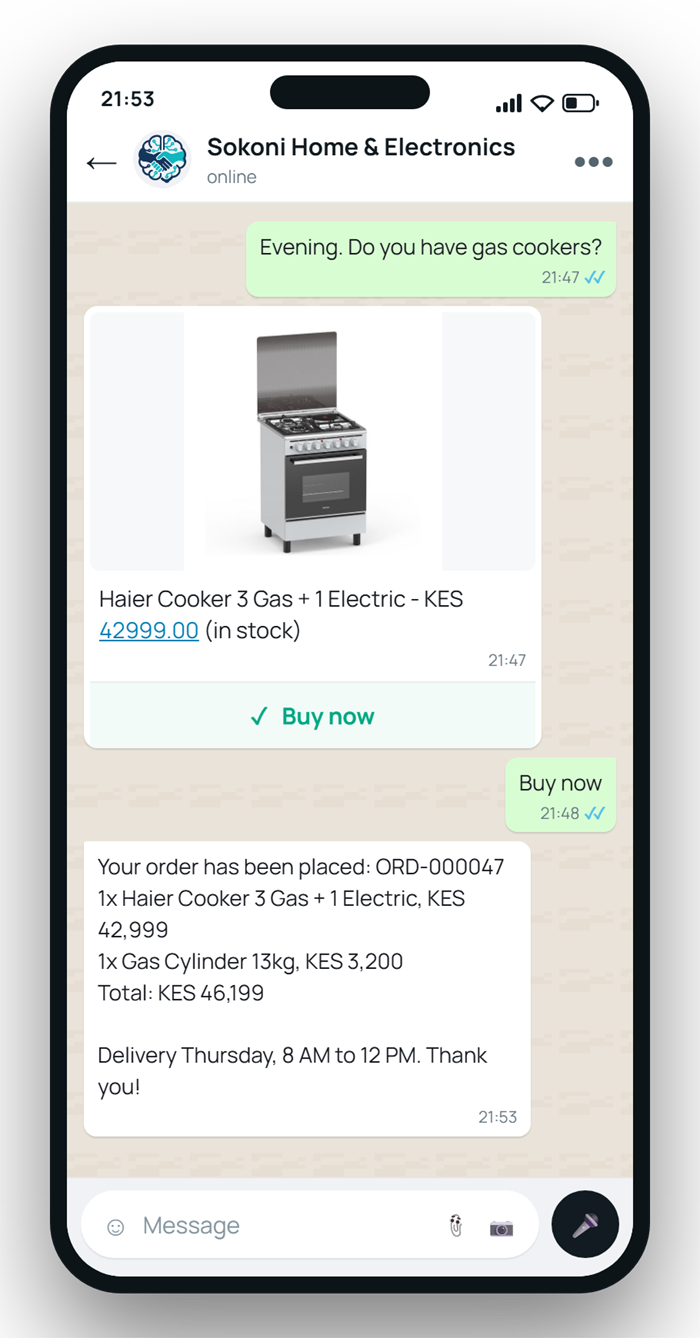
When your AI recommends something, the customer gets a proper card: the product photo, the name, the price, and a Buy now button they tap once.

Up to three products per reply, sent in order, so the conversation reads like a shop assistant instead of a spam blast.

Tapping Buy now takes the customer straight to ordering. No link, no redirect, no leaving WhatsApp.

๐Ÿฅค
Ramtons 1.5L Glass Jar Blender
Kitchen appliances ยท Buy now
KES 5,300
๐Ÿฅค
Von 1.5L 2-in-1 Blender
Kitchen appliances ยท Buy now
KES 5,850
๐Ÿซ–
Ramtons 1.7L Cordless Kettle
Kitchen appliances ยท Buy now
KES 3,100
AI drafts, you approve

The AI sells. You stay in control.

When a customer commits, the AI writes up the order with items, quantities, prices, and the total, then hands it to your team. Nothing becomes a real order until a human approves the reply.

Change it, correct it, or throw it out. Your call, every time.

Prefer full autopilot? Turn the approval step off. Prefer the AI never take orders at all? There is a switch for that too.

๐Ÿงพ
Order draft #HC-1042
Awaiting approval
KES 10,900
๐Ÿฅค
1.5L Glass Jar Blender ร— 2
Drafted by AI
KES 10,600
๐Ÿ›ต
Delivery ยท Kasarani
Editable before approval
KES 300
โœ“
Approved by Sarah
10:19 AM ยท Order confirmed

One catalog behind every conversation.

Add a product once and the AI can sell it on every channel you have connected.

Every channel, one catalog

WhatsApp, Telegram, Facebook, Instagram, and the chat widget on your website all read the same catalog. Update a price in one place and it is right everywhere.

A sensible fallback

On SMS and email, where images are not an option, customers get a clean text list with names and prices instead of a broken attachment.

A real cart on your website

Visitors browse products in the chat window, add what they want to a cart, and check out without leaving the conversation. The cart survives if they close the tab.

Nothing to train

No bot training, no flow builder. Add a product with its photo and price and your AI can sell it in the next message.

Descriptions written for you

Upload a photo and our AI describes what is in it, so the item is findable even when all you typed was a name.

Orders that hold up

Every order gets a number, a status, and a history of who changed what. Prices and names are frozen onto the order when it is placed, so last month's orders stay correct after this month's price change.

Three steps to selling.

Most businesses are taking orders on the same afternoon they sign up.

1

Add your products

Name, price, photo. Our AI writes the description and makes the image searchable. Only the name is required to save.

2

Connect your channels

WhatsApp, Instagram, Facebook, Telegram, and your website, using the numbers and pages you already have.

3

Start selling

Customers ask by name, by description, or by photo. The AI answers with product cards and drafts the order. You approve.

What each plan includes.

Most catalog features are the same on every plan. What changes is how many products you can hold, and visual search, which is available from Growth up.

CatalogStarterGrowthPremium
Products50500Unlimited
Product photosโœ“โœ“โœ“
Visual (photo) searchโœ—โœ“โœ“
WhatsApp product cardsโœ“โœ“โœ“
AI order captureโœ“โœ“โœ“
Website chat cartโœ“โœ“โœ“

Visual search is available on Growth and up. See full pricing.

Shipping soon.

We build in the open. Here is what is landing next, and roughly when.

Next release

Bulk catalog import

Upload a spreadsheet and bring your whole catalog in at once, images included.

Following

Stock tracking

Live quantities that count down as orders come in, with low-stock alerts and automatic out of stock, so the AI never sells what you do not have.

Following

Product variants

Sizes, colours, and options on a single product, each with its own price and stock.

In development

WooCommerce and Shopify sync

Connect your existing store and keep your catalog in sync automatically.

Building on one of these and want early access? Talk to us. We prioritise by what customers ask for.

Frequently asked questions.

What business owners ask before they move their catalog into chat.

Do I need an online store to sell with HabariChat?
No. HabariChat is the storefront and it lives inside the conversation. Customers browse, ask, and order without leaving the chat. If you already run an online store, connecting it so the two stay in sync is on our roadmap.
How do products get into the catalog?
You add them in the HabariChat dashboard with a name, price, photo, and category. Only the name is required. Our AI writes the description from your photo and makes the image searchable. Bulk spreadsheet import is coming in the next release.
Can the AI sell without me watching?
By default the AI drafts the order and a person on your team approves it before it becomes real. You can switch approval off for full autopilot, or disable AI ordering entirely and let the AI recommend products only.
What happens if the AI recommends the wrong product?
You see every reply before it sends and you can edit it. Orders stay drafts until a human approves them, so you can change items and quantities, correct the price, or discard the draft.
Which channels can show product photos?
WhatsApp, Telegram, Facebook, Instagram, and website chat all send real images. WhatsApp sends a product card with a Buy now button. On SMS and email, where images are not an option, customers get a clean text list with prices instead.
How many products does the AI show at once?
Up to three per reply, deliberately. Sending twenty products to someone who asked one question is how businesses get reported and blocked.
What image formats and sizes can I upload?
JPG, PNG, and WebP, up to 10MB each and ten files at a time. HabariChat optimises them automatically for WhatsApp delivery. One clear shot of the product on a plain background searches better than a busy lifestyle photo.
Who on my team can edit the catalog?
Owners and admins can add and edit products. Other roles can view the catalog but not change it. You set this per role in your organisation settings.
Your customers already message you. Now they can buy.

Start your 14-day free trial. No credit card required.