Upload documents to the knowledge base
This is how the AI learns your business. Upload your price lists, policies, catalogues and manuals, and the AI answers customers straight from them.
Upload documents
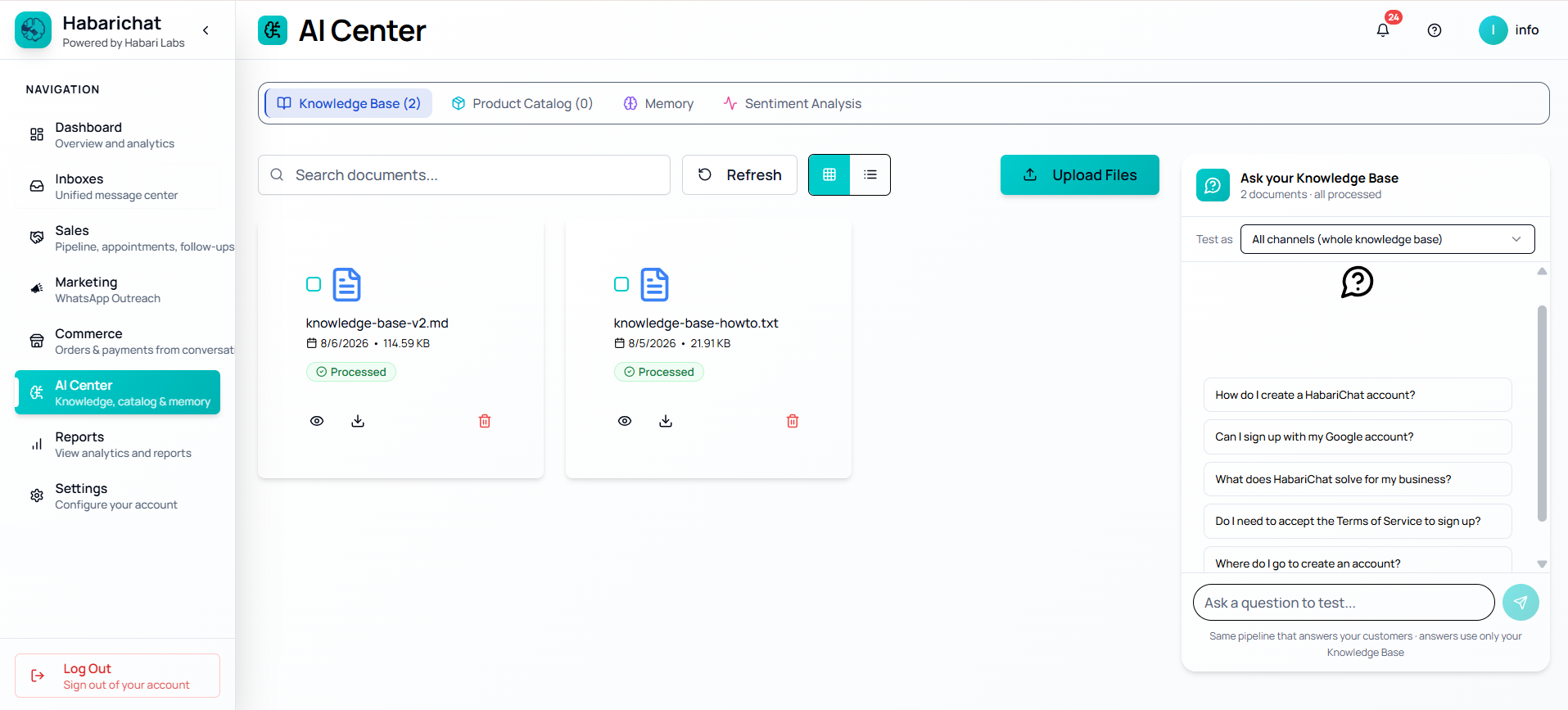
- Log in and open AI Center in the left navigation, then stay on the Knowledge Base tab.
- Click Upload Files and select your files, you can upload several at once.
- Wait for processing, this takes seconds to minutes for small files, and up to about 15–60 minutes for larger ones.
- Each file shows Processed when the AI can answer from it.
Supported formats include PDF (brochures, catalogues, price lists), Word documents (manuals, procedures), Excel sheets (inventory, menus), and text files (FAQs), plus CSV, PPT, and website URLs. You can mix formats freely and keep adding more over time.
Common questions
Log in and open AI Center in the left navigation, stay on the Knowledge Base tab, click Upload Files and select your files (you can upload several at once), then wait for each file to show Processed.
PDF, Word documents, Excel sheets and text files, plus CSV, PPT and website URLs. It can also pull text out of scanned PDFs, photos and handwritten documents using OCR. You can mix formats freely.
Processing takes seconds to minutes for small files, and up to about 15 to 60 minutes for larger ones. A document is ready for the AI once its status shows Processed.