WhatsApp Embedded Signup errors
When you connect WhatsApp, the whole setup happens inside Meta's secure Embedded Signup popup. If Meta blocks a step, the popup shows the exact reason. Here is how to read those messages, fix the common ones yourself, and report anything that's stuck.
First, read the error
Most Embedded Signup errors are not bugs. They are Meta telling you that a setting on your number or business needs to change before it can be connected. Before you report anything, do three quick things:
- Read the full message. It usually names the exact setting and where to change it, for example "turn off Auto labels in Business tools > Labels in your WhatsApp Business app."
- Fix the setting and retry. Make the change in the WhatsApp Business app or Meta Business Manager, then click Connect WhatsApp again. Many errors clear on the next attempt.
- Note the error code. If it still fails, copy the code in brackets (for example
#3441061) and take a screenshot so support can trace it.
"Your phone number is already linked to automatic events"
This is the most common Embedded Signup error for numbers already used in the WhatsApp Business app. The popup shows:
(#3441061:019f02ac-...-0b130d9a5ae5)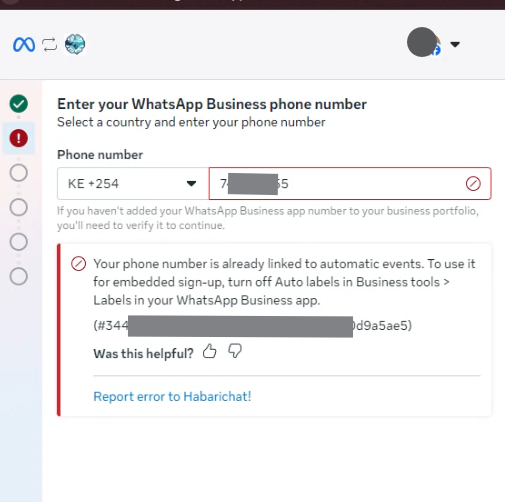
What it means
Your number has Auto labels (automatic events) switched on in the WhatsApp Business app. Auto labels automatically tag chats like "New customer" or "Pending payment." Meta does not allow a number with Auto labels active to go through Embedded Signup, so the connection is blocked until you turn that feature off.
How to fix it
- Open the WhatsApp Business app on the phone that holds this number.
- Go to Settings (or the menu) and tap Business tools.
- Open Labels and turn Auto labels off.
- Return to HabariChat and click Connect WhatsApp to run Embedded Signup again.
About the error code
The code has two parts. #3441061 is Meta's stable subcode for the Auto labels conflict, so it is the same for everyone who hits this error. The long string after the colon (here shown as 019f02ac-...-0b130d9a5ae5) is a one-time trace ID that is unique to your attempt: it changes on every try and is different for each business. When you report the error, the trace ID helps us look up your exact session, so include it if you can.
Other errors you may see
These are the other messages Embedded Signup can show. Most point to a setting you can change yourself in the WhatsApp Business app or in Meta Business Manager.
| Error | What it means | How to fix it |
|---|---|---|
| Number already registered / "Number already in use" | The number is already on an existing WhatsApp account. | Delete that account in the WhatsApp app first, or use Coexistence to keep it on your phone and link it to the API. |
| Two-step verification (PIN) is on | The number has a registration PIN that blocks migration. | In the WhatsApp Business app, open Settings > Account > Two-step verification and turn it off, then retry. |
| Verification code not arriving | The SMS or voice code never reaches the number. | Check the country code and number, request a voice call instead of SMS, and make sure the number can receive codes. |
| Too many attempts / code rate-limited | Meta has temporarily blocked new code requests. | Wait (usually up to 24 hours) before requesting another code. Don't keep retrying. |
| Not an admin of the business portfolio | Your Facebook login doesn't have full admin rights. | Sign in with a Facebook account that is a full admin of the business portfolio, or ask an admin to run the setup. |
| Permission errors | Some permissions weren't granted in the Meta popup. | Run Embedded Signup again and accept all permissions HabariChat requests. |
| Popup blocked or closed early | The browser blocked the popup, or it was closed mid-setup. | Allow popups for the HabariChat dashboard and don't close the window until it finishes. |
| Display name rejected | The chosen WhatsApp display name breaks Meta's rules. | Choose a name that follows Meta's display-name guidelines and submit again. |
| Business not verified | Meta Business Verification isn't complete, so messaging is limited. | Finish Business Verification in Meta Business Manager to lift the limits. You can still connect in the meantime. |
| "Failed to get WhatsApp OAuth URL" | HabariChat couldn't start the Meta session. | Check your internet connection and retry. |
| Number missing after authorising | The connection finished but the number doesn't show. | Confirm the number is active in Meta Business Manager, then refresh the Inboxes page. |
| Coexistence: number not active | For Coexistence, the number must already be live in the app. | Make sure the number is active in the WhatsApp Business app (not the personal WhatsApp app) before connecting. |
Report or escalate an error
If you've read the message, fixed the setting it names, and it still won't connect, send it to us:
- Report from the popup. Click the "Report error to HabariChat!" link shown under the error. This sends us the details of that attempt directly.
- Escalate with a screenshot. Prefer to reach us another way? Message us on WhatsApp (+254 705 779 679) or via Contact support and attach a screenshot of the full error, including the code in brackets.
#3441061 and the trace ID after it), the number you're connecting, and which option you chose (new number, a number on Meta, or Coexistence). That lets us trace it on the first reply.Common questions
Auto labels is a WhatsApp Business app feature that automatically tags incoming chats with labels like "New customer" or "Pending payment." Meta refers to this as Automatic Events. The error appears because your number has this switched on, and Embedded Signup cannot run while it is active.
Two common reasons. The change can take a minute to register on Meta's side, so wait and retry. And make sure you switched off the master Auto labels toggle in Business tools > Labels, not just removed labels from individual chats. Removing a label from a chat does not disable the Automatic Events feature.
No. Your existing labels stay where they are. Turning off Auto labels only stops new chats from being tagged automatically from now on. Nothing is removed from past conversations.
Open the app, tap Settings or the menu, then Business tools, then Labels. The Auto labels toggle is inside Labels. The exact wording and position can vary by app version, so update to the latest version first if you do not see it.
Auto labels is an automation that lives inside the WhatsApp Business app. Embedded Signup moves your number onto the WhatsApp Business Platform, where that app-side automation cannot run. Meta requires the conflicting feature off first so the number can move cleanly without two systems trying to manage the same chats.
No. This is a configuration block, not a penalty. It only means one setting on the number conflicts with Embedded Signup. Once Auto labels is off and you retry, the number connects normally.